← Back to Insights EngineYour numbers,
Mail OutsAvailable on all tiers
Your numbers,
delivered to your inbox.
The stats that matter, pushed to you on a schedule you set — pulled directly from your live Insights Engine. With one click back to the full dashboard.
How it works
Three steps. Fully automated.
Mail Outs run from the same pipeline powering your dashboard — no separate setup, no duplicate data sources.
01
Tied to your live reports
Mail Outs read directly from the same data pipeline that powers your Insights Engine dashboard. No separate configuration, no duplicate data sources — it's always current.
02
Set your schedule or trigger
Choose when it fires. Scheduled delivery — daily, weekly, monthly — or trigger-based, for example when a metric crosses a threshold or a financial period closes.
03
Your numbers land in your inbox
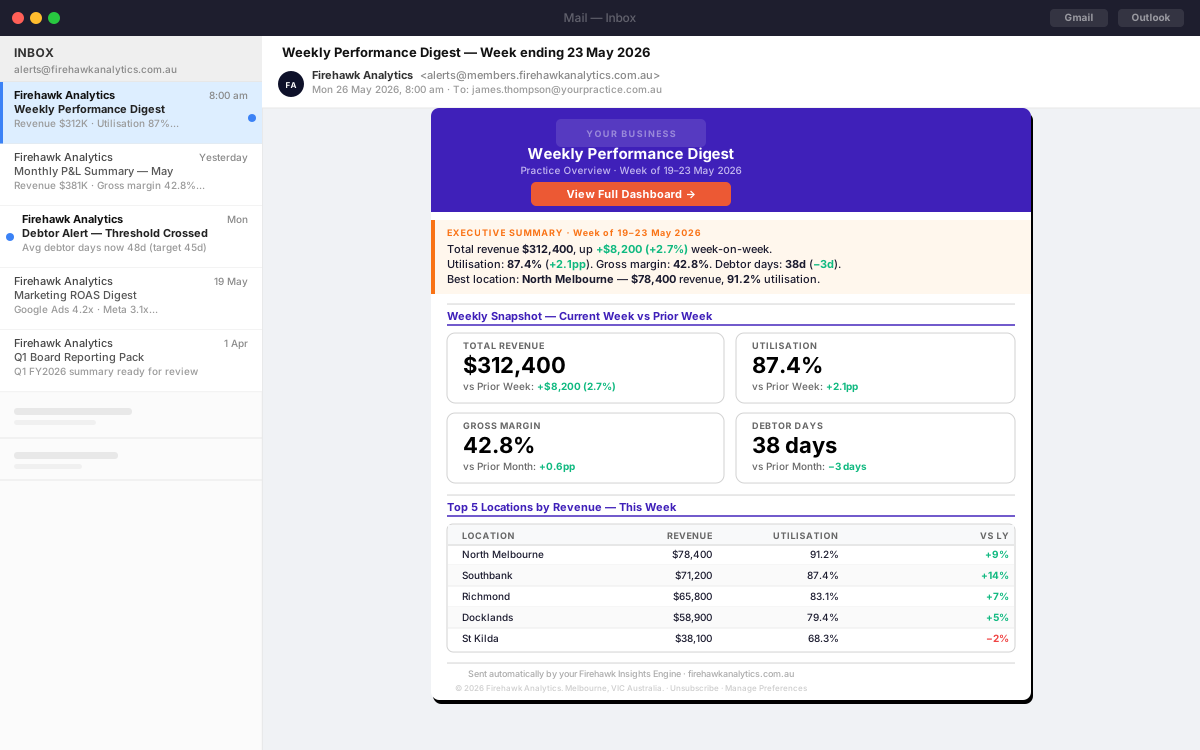
A clean, formatted digest with the exact stats you configured — plus a direct link back to your live dashboard for the full picture. No login required to read the summary.
Delivery options
Your cadence. Your choice.
Schedule at a fixed time, or fire on a trigger. Either way, it runs without you.
Daily
Morning digest or end-of-day wrap. Ideal for utilisation, bookings, and daily revenue.
Weekly
Monday morning or Friday close. Best for P&L, pipeline, and weekly marketing performance.
Monthly
End-of-month reporting. P&L, cashflow, and KPI comparison against prior month and budget.
Threshold trigger
Fire when a metric crosses a value — revenue drops below target, utilisation under 80%, debtors above 45 days.
Custom cadence
Any day, any time. Configure the schedule that fits your business rhythm exactly.
Period close
Triggered when a financial period closes. Automated end-of-month or end-of-quarter reporting packs.
Example reports
What businesses send.
Common Mail Outs configured by Firehawk members. Each one runs automatically — no manual export, no admin.
Weekly P&L summary
Every Monday morning: revenue, gross margin, and net profit for the prior week — compared to the same week last year and your budget.
Weekly · Monday 8amDaily utilisation alert
Each morning at 7am: yesterday's utilisation rate by location. Flag anyone under target before the day begins.
Daily · 7amMonthly cashflow report
First business day of each month: opening cash, collections, outflows, and closing position — compared to forecast.
Monthly · 1st of monthMarketing ROAS digest
End of each week: spend, clicks, conversions, and ROAS by channel — with a comparison to last week and your CPA target.
Weekly · Friday 5pmDebtor days trigger
When average debtor days exceed your configured threshold, an alert fires immediately with the current outstanding position.
Trigger-basedBoard reporting pack
End-of-quarter summary with revenue, margin, pipeline, and market context — delivered automatically before the board meeting.
Quarterly · Custom dateMail Outs
Stop checking. Start receiving.
Mail Outs are included with every Insights Engine tier. Start with Firehawk Lite and have your first automated report configured in minutes.
Get started for free